 Hours:
Chapter 2: How to Create a Company in SAP
Define Company
In this tutorial, we will learn How to Create a Company
Step 1) Enter Transaction code SPRO in the command field
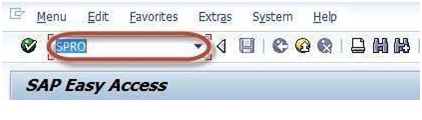
Step 2) In the next screen Select SAP reference IMG
Step 3) In next screen Display IMG follow the menu path
SAP Customizing Implementation Guide -> Enterprise Structure -> Definition-> Financial Accounting -> Define Company
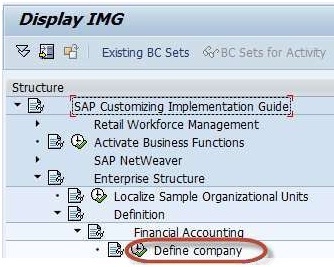
Step 4) In the next Screen
1) Press New Entries

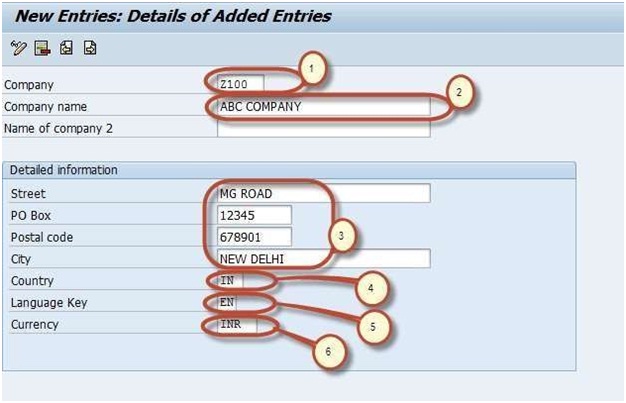
Step 5) In the next Screen Enter the Company Details :
1. Enter a unique Company Id for the Company within your corporate group
2. Enter the Company Name
3. In the Detailed Information Section Enter the Company Address details such as Street , PO Box, Postal Code, City
4. Select Country code for country the company is established
5. Select Default language for the Company for Print forms and Default Texts
6. Select a Local Currency for the Company
Step 6) After completing all the required information ,press save Enter your customizing request number
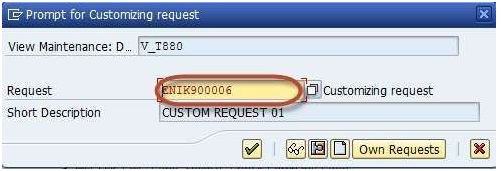
and your company is created.